> For the complete documentation index, see [llms.txt](https://codalin.gitbook.io/nodalin-docs/llms.txt). Markdown versions of documentation pages are available by appending `.md` to page URLs; this page is available as [Markdown](https://codalin.gitbook.io/nodalin-docs/nodes-reference/streams/point.md).

# Point

<table data-header-hidden><thead><tr><th width="141.6597900390625"></th><th></th></tr></thead><tbody><tr><td><div><figure><img src="https://937151318-files.gitbook.io/~/files/v0/b/gitbook-x-prod.appspot.com/o/spaces%2F44MuVIHBk5o5yfcGn64w%2Fuploads%2FHBAPdG5nkI6KHIVC3ACi%2Fimage.png?alt=media&amp;token=4030ed73-12d5-4237-9d6a-64854df57af1" alt="" width="76"><figcaption></figcaption></figure></div></td><td>Outputs a value of the datatype <code>point</code> — a coordinate tuple (x, y, rotation). It can read and track the position of shapes, with optional easing for smoother motion. Use it to set the origin of shapes (aka transform it) or to pass coordinates between nodes. useful to create orbiting movements if used with rotation, or to create mouse following movements and a chain of shapes.</td></tr></tbody></table>
<table><thead><tr><th width="155.0703125">Property name</th><th width="405.32421875">Description</th><th>Compatible datatype</th></tr></thead><tbody><tr><td>x</td><td>Horizontal position (in pixels)</td><td>number</td></tr><tr><td>y</td><td>Vertical position (in pixels)</td><td>number</td></tr><tr><td>rot</td><td>Rotation (in degrees)</td><td>number</td></tr><tr><td>transmitRot</td><td>Transmit rotation from location input</td><td>boolean</td></tr><tr><td>location</td><td>Shape to extract location from</td><td>figure</td></tr><tr><td>easing</td><td>Smooth interpolation between changing coordinates</td><td>number</td></tr></tbody></table>

### Origin's BFF

As we've covered on the [Conventions](/nodalin-docs/nodes-reference/conventions.md#origin-point) chapter

> Every renderable element has a local origin point located at its center. All transformations — translation, rotation, and scaling — happen relative to this origin.

You can override this default behavior by connecting a **Point** node to the `origin` property. This allows you to:

* rotate a shape around an external pivot to create orbiting movements, while retaining the ability to rotate the figure around itself.
* offset a figure before other operations
* create more complex chained transformations, for example move a shape around the canvas and let other shapes follow the same movement path while retain their individual localised animation.

### Example Projects

[In Orbit](https://app.nodalin.xyz/project/fcb6f92f-ffe3-45bd-9108-5d6a492a2d0f)\
Demonstrates how the Point node can be used to create orbiting motions while figures can rotate around their own center.

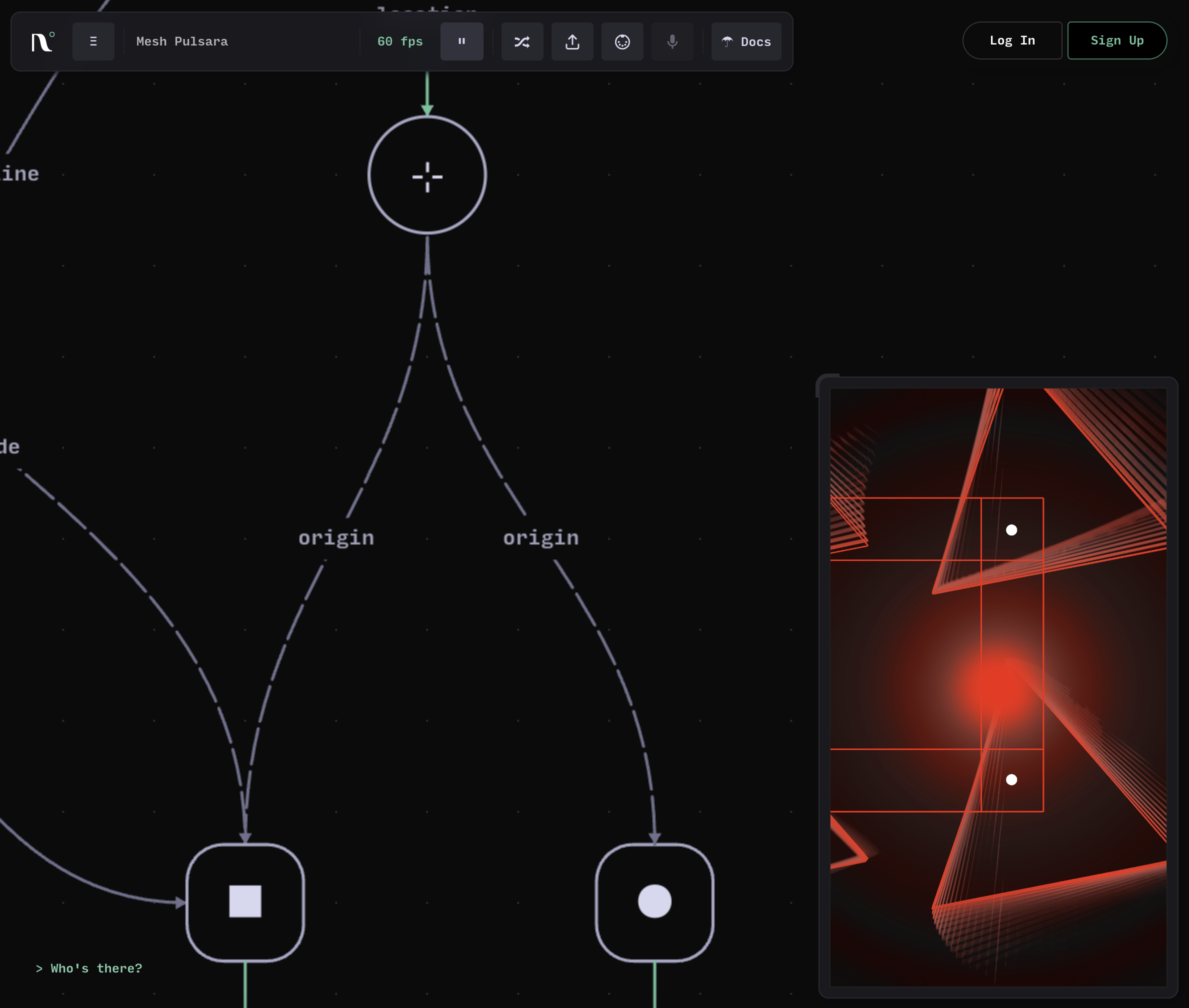
[**Mesh Pulsara**](https://app.nodalin.xyz/project/ec509244-417d-41b9-8685-5c4abb69a511)\
In this example the Point node is used to extract the coordinates and pass them over to other Source nodes.

<div data-with-frame="true"><figure><img src="https://937151318-files.gitbook.io/~/files/v0/b/gitbook-x-prod.appspot.com/o/spaces%2F44MuVIHBk5o5yfcGn64w%2Fuploads%2FxjKgX082IbDbeMRPxcEf%2Fimage.png?alt=media&amp;token=910f298d-9fd4-4484-bf7f-8e6c935897c7" alt="" width="375"><figcaption></figcaption></figure></div>

[**Wire Canvarin**](https://app.nodalin.xyz/project/694d88bd-455e-40f0-9021-b57027be8b8d)\
In this example the green visual is rapidly oscillating on its x axis, creating this illusion of two overlapping circle. The Point node is used to relocate the entire visual in random positions, by translating its origin.

<div data-with-frame="true"><figure><img src="https://937151318-files.gitbook.io/~/files/v0/b/gitbook-x-prod.appspot.com/o/spaces%2F44MuVIHBk5o5yfcGn64w%2Fuploads%2FHP0LFAWMrzLUS7osAo6Q%2Fimage.png?alt=media&amp;token=49c8d2d3-9a73-4dd9-9bc3-3e741b408c3c" alt="" width="375"><figcaption></figcaption></figure></div>

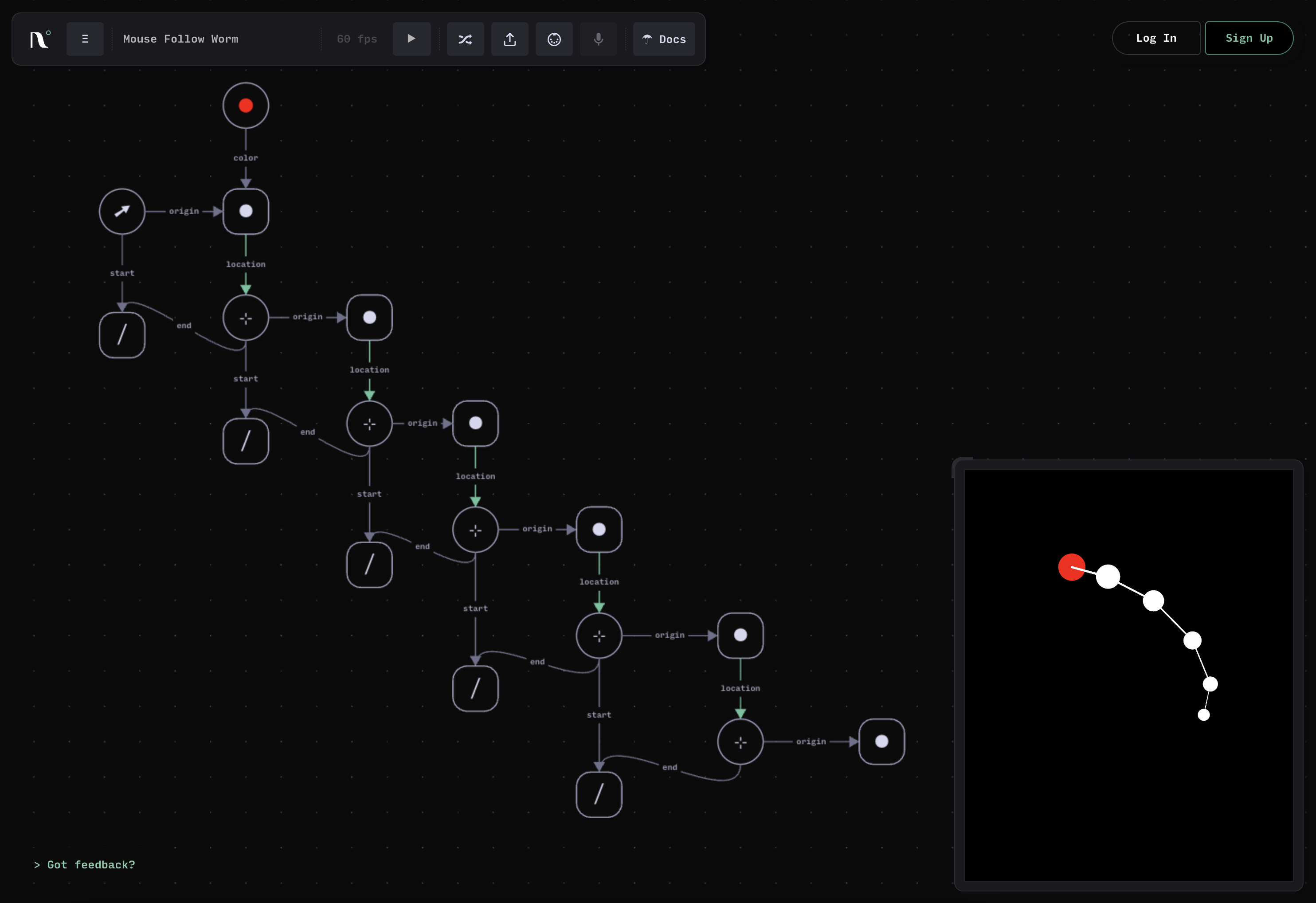
[**Mouse Follow Worm**](https://app.nodalin.xyz/project/0c967737-ba59-4bfd-ac0c-344baaba2728)\
In this example, the Mouse node is used to control the position of the red circle, while the rest of the tail-following effect is accomplished by a series of Point nodes which extract the position of their parent node.  Each Point node has a slightly larger easing value which creates an organic motion.

<div data-with-frame="true"><figure><img src="https://937151318-files.gitbook.io/~/files/v0/b/gitbook-x-prod.appspot.com/o/spaces%2F44MuVIHBk5o5yfcGn64w%2Fuploads%2FxRycMMqjzgONx8V4eBPd%2Fimage.png?alt=media&amp;token=bfa4a2fc-7d46-4c91-a01b-fcb16cdcdc24" alt="" width="375"><figcaption></figcaption></figure></div>