> For the complete documentation index, see [llms.txt](https://codalin.gitbook.io/nodalin-docs/llms.txt). Markdown versions of documentation pages are available by appending `.md` to page URLs; this page is available as [Markdown](https://codalin.gitbook.io/nodalin-docs/nodes-reference/conventions.md).
# Conventions
Nodalin follows a handful of simple conventions that keep the graph predictable, intuitive, and easy to reason about. Understanding these basics will make it easier to read the Node Reference, connect values correctly, and understand how nodes behave when you start building projects.
***
## Coordinate System
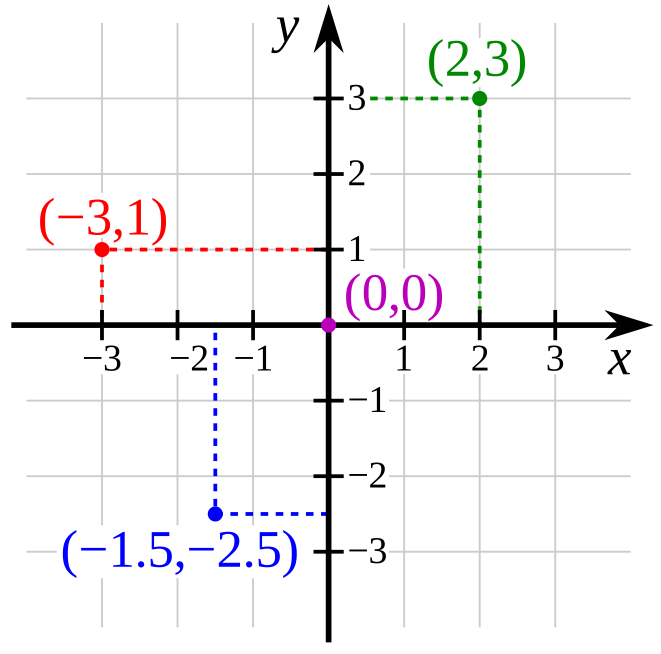
Nodalin uses a standard Cartesian coordinate system.
If a renderable element is positioned at (0, 0), it appears in the center of the Render view.
* Positive X → right
* Negative X → left
* Positive Y → up
* Negative Y → down
This is the opposite of some 2D systems where Y increases downward, but it makes spatial reasoning more intuitive in Nodalin.
### Origin Point
Every renderable element has a local origin point located at its center. All transformations — translation, rotation, and scaling — happen relative to this origin.
***
## Types of Data
Throughout the Node Reference you'll notice that
* All nodes output a value of a certain type of data
* Each node property has a compatible type of data.
These data types describe what kind of information a node outputs and a property can receive — for example, a `number`, a `color`, a `point` in space, or a piece of `text`. Matching types ensures valid connections and predictable behavior.
Nodalin works with a small set of custom data types:
* **Boolean** - True or false
* **Figure** - Everything that makes a shape: type, coordinates, rotation, color, and more
* **Text** - A series of characters, symbols and numbers
* **Color** - An HLS value - Hue, Luminosity, Saturation
* **Number** - Integers and floating-point numbers
* **Point** - A set of coordinates and rotation
These form the backbone of how information flows through the graph.
***
## Units
#### Pixels vs Normalized Values
Nodalin uses pixel values instead of normalized ranges (0–1 or –1 to 1). This is intentional:
* Pixels are familiar and beginner-friendly
* No conversions are required
* All nodes operate in the same space
* Animation and layout remain intuitive
### Rotation
Rotation is expressed in degrees, not radians. This keeps values readable:
* 0° → no rotation
* 90° → quarter turn
* 180° → flipped
* 360° → full rotation
### Time
Nodalin measures duration in seconds.
{% hint style="warning" %}
~~Nodalin currently measures duration in frames (pre-beta). In the near future, this may switch to seconds to maintain consistent animations during FPS changes.~~
{% endhint %}
### Composition & Layers
Nodalin doesn’t require an output node to draw something on screen. From the very beginning, this was a deliberate design choice: if a node can render, it renders immediately. Drop a Square node onto the graph and—done—a white square appears in the Render View.
When you start connecting effects or additional shape nodes to that square, you’re creating an output chain. Output chains are marked with an accent color in the graph.
Now for the composition part: if you add another shape node—for example, a circle—it also renders instantly, blended on top of the existing visual. Extending that circle with effects or other shapes forms a second output chain. Nodalin automatically handles how these chains blend together and in what order they appear.
You may inspect and change the order of output chains using the Layers button on the Project toolbar
A single shape node can also branch: it might render as a shape *and* simultaneously act as an instancing source for other shapes. Each branch becomes its own output chain, and Nodalin manages them all without any special setup on your part.

 Layers button on the Project toolbar

